We believe you should be able to have private conversations on your devices, just like you would in person. That’s why WhatsApp provides a private and secure experience for everyone, with default end-to-end encryption for your personal messages and calls. We’re always building more layers of security, and for the few people who may be targets of sophisticated and rare cyber attacks — like journalists or public figures — we’re adding a new extreme protection feature called Strict Account Settings.
This lockdown-style feature bolsters your security on WhatsApp even further with just a few taps by locking your account to the most restrictive settings like automatically blocking attachments and media from unknown senders, silencing calls from people you don’t know, and restricting other settings that may limit how the app works. You can turn on Strict Account Settings, which will be rolling out in the coming weeks, by going to your WhatsApp Settings, then to Privacy, and then to Advanced.
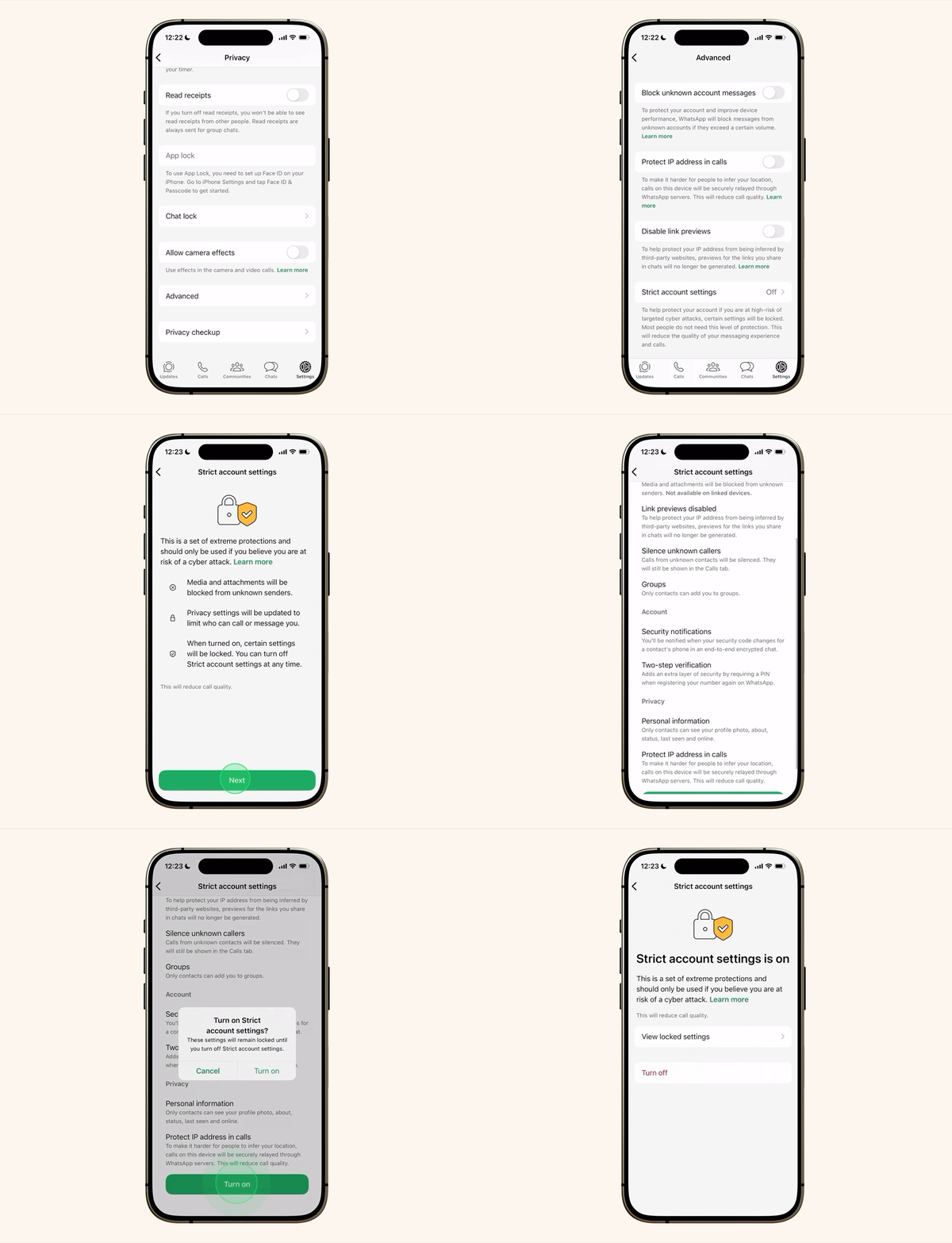
Strict Account Settings is one of the many ways we’re working to protect you from the most sophisticated cyber threats. You can learn more about Strict Account Settings on WhatsApp and how to use the feature here.


